What is SafarTrak MCP?
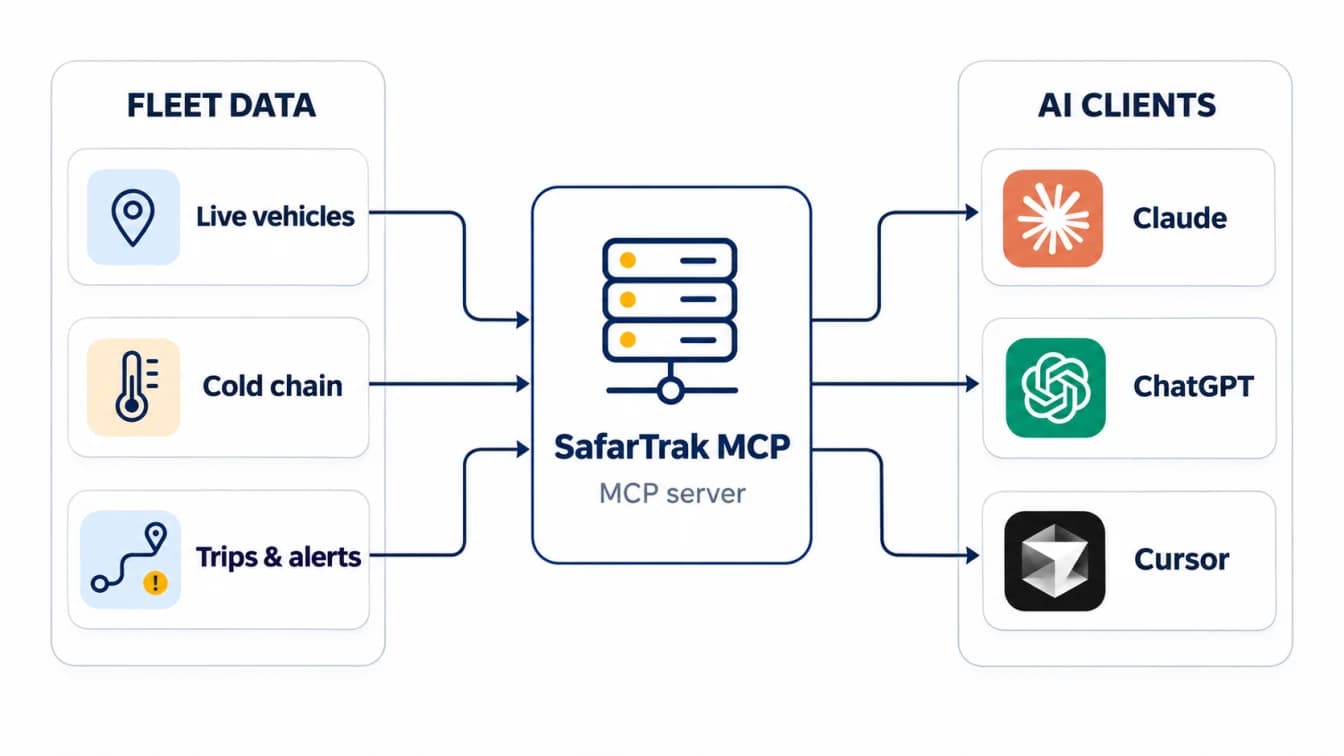
SafarTrak MCP connects the AI assistant your team already uses to live SafarTrak data. MCP, the Model Context Protocol, is an open standard that lets assistants such as Claude and ChatGPT call tools in other systems. Once connected, you can ask about vehicles, reefer temperatures, alerts, trips and utilisation in plain language, and the assistant answers from your own account.
It works in Claude, where SafarTrak is listed in the Claude Directory, in ChatGPT, and in coding tools and agents such as Claude Code, Cursor, VS Code with GitHub Copilot, Windsurf and Microsoft Copilot Studio.
Ask across modules in one question
Live fleet: how many vehicles are moving, idle or offline, where a vehicle is and what it did today. Cold chain: which reefers are outside their range, by how much and for how long. Alerts: summaries and events by vehicle, type and severity. Trips: status, checkpoints, load-in and load-out events and temperature abuse. Analytics: distance trends, highest and lowest vehicles, and kilometre and hour utilisation against vendor contracts.
Because the assistant can call several tools in one answer, a question such as “Which reefers are out of range right now, and which trips are they on?” combines temperature and trip data without anyone building a report.
Act on the answer, with your approval
Four tools change data, and only trip schedules: create a trip, update it, mark it delivered or cancel it. They are available only if you allow trip changes when you connect, and the AI app asks you to approve each change before it is made. Nothing can be deleted, and vehicles, users, devices, alerts and settings stay read-only.
How access and security work
You sign in with your SafarTrak portal login as a company admin, or with an API key and password. Your password goes only to SafarTrak. The connection gets its own named “AI assistant (MCP)” key in API Credentials, stored encrypted with AES-256-GCM, and the AI app receives a short-lived token that renews in the background. After 180 days without use, you sign in again.
Every answer comes from live data with your company's SafarTrak access; nothing is copied or synced elsewhere, and SafarTrak does not receive your chats or files, only the lookups the assistant makes. To stop access, disconnect in the AI app or revoke the key in API Credentials.
Connect in about a minute
In Claude, open the Directory, search for SafarTrak, click Connect to Claude and sign in. In ChatGPT, add SafarTrak as a custom MCP server with the URL https://mcp.safartrak.com/mcp and OAuth, then type @SafarTrak in a chat. Setup for other apps, the full tool list, limits and troubleshooting are on the SafarTrak MCP page, with short videos for Claude and ChatGPT.
A good first question is “How many vehicles do I have, and how many are moving, idle or offline right now?” It confirms the connection and shows the live data the assistant can see.
Frequently asked questions
Which SafarTrak customers can use MCP?
Any customer with API access. Company admins connect with their portal login; other users connect with an API key and password from API Credentials.
Can the assistant change or delete data?
It can create, update, close or cancel trip schedules, only if you allow it when connecting and only after you approve each change. It cannot delete anything.
Does SafarTrak see my AI conversations?
No. SafarTrak only receives the lookups the assistant makes, such as a vehicle or date range, and returns that data.
How do I turn it off?
Disconnect SafarTrak in your AI app, or have a company admin revoke the “AI assistant (MCP)” key under API Credentials. Either stops access immediately.
Sources and further reading
Features, limits and security details are taken from the SafarTrak MCP server and its public documentation at safartrak.com/mcp, checked on 13 November 2026. Availability of connectors depends on your AI app's plan and workspace settings.
BRING IT TO YOUR FLEET
Start with your vehicles.
Ask the right questions.
Share your vehicle mix, existing devices and required signals with the SafarTrak team.
Connect SafarTrak MCPDiscuss your deployment